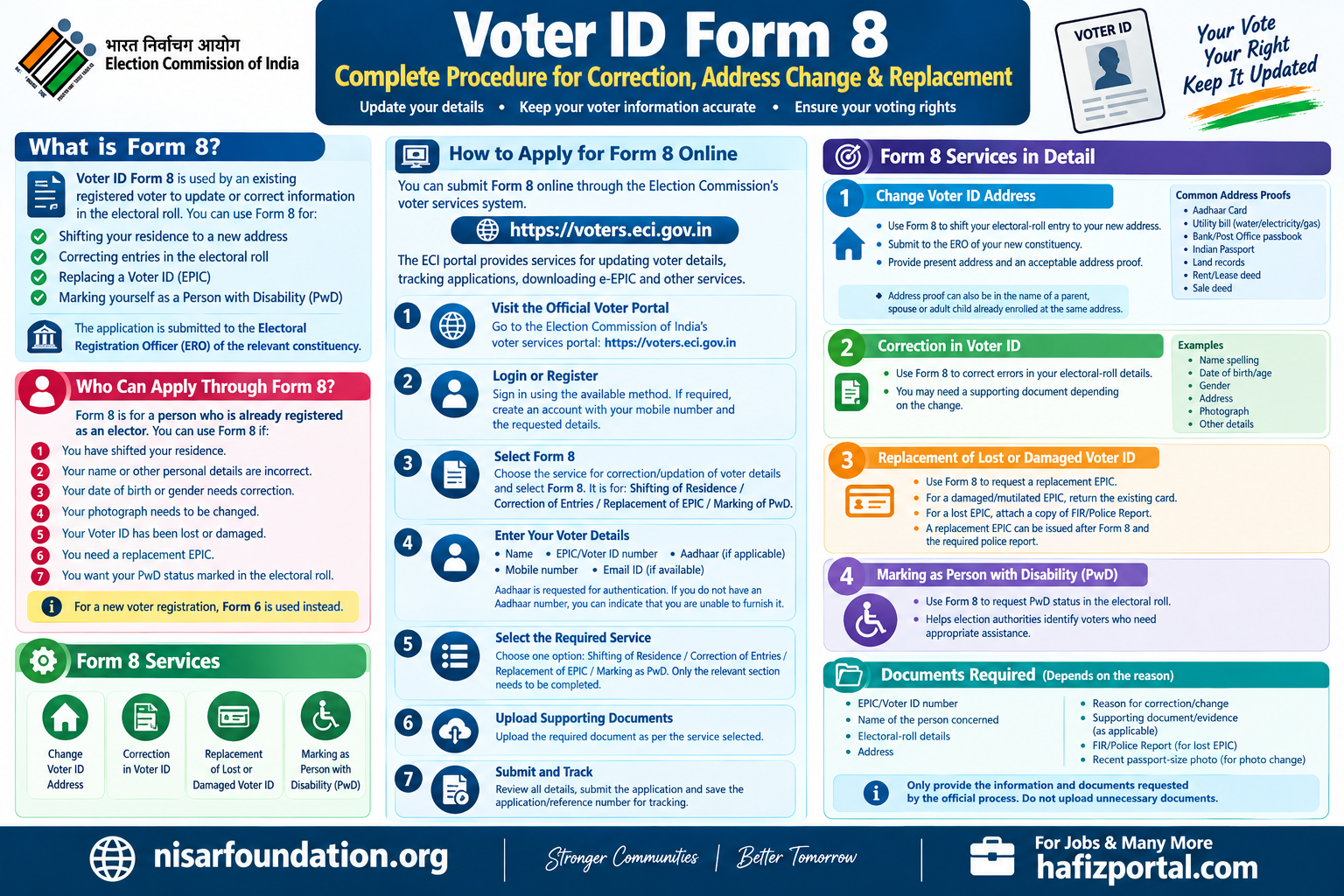
Voter ID Form 8: Complete Procedure for Correction, Address Change & Replacement
Voter ID Form 8: Complete Procedure for Correction, Address Change & Replacement
Voter ID Form 8 is used by an existing registered voter to update or correct information in the electoral roll. The Election Commission of India (ECI) allows eligible voters to use Form 8 for shifting their residence, correcting entries, replacing a Voter ID (EPIC), or marking themselves as a Person with Disability (PwD).
If your name is already registered as a voter but your address, name, date of birth, gender, photograph or another detail is incorrect, Form 8 can be used to request the necessary correction.
What is Form 8?
Form 8 is an official Election Commission of India application for:
- Shifting residence to a new address
- Correction of entries in the electoral roll
- Replacement of EPIC/Voter ID
- Marking a voter as a Person with Disability (PwD)
The application is submitted to the Electoral Registration Officer (ERO) of the relevant constituency.
Who Can Apply Through Form 8?
Form 8 is meant for a person who is already registered as an elector.
You can use Form 8 if:
- You have shifted your residence.
- Your name or other personal details are incorrect.
- Your date of birth or gender needs correction.
- Your photograph needs to be changed.
- Your Voter ID has been lost or damaged.
- You need a replacement EPIC.
- You want your PwD status marked in the electoral roll.
For a new voter registration, Form 6 is used instead.
Form 8 Services
1. Change Voter ID Address
If you have permanently shifted your residence, you can use Form 8 to request shifting of your electoral-roll entry to your new address.
The application should be submitted to the ERO of the constituency where your new ordinary residence is located.
You need to provide your present residential address and an acceptable address proof.
Common Address Proofs
The current Form 8 lists documents such as:
- Aadhaar Card
- Water, electricity or gas connection bill
- Current passbook of a Nationalized/Scheduled Bank or Post Office
- Indian Passport
- Revenue Department land ownership records
- Registered Rent/Lease Deed
- Registered Sale Deed
The address proof can, in specified circumstances, also be in the name of a parent, spouse or adult child already enrolled as an elector at the same address.
2. Correction in Voter ID
If there is an error in your electoral-roll details, Form 8 can be submitted for correction.
Depending on the information requiring correction, you may need to provide a supporting document.
Examples include:
- Name spelling
- Date of birth/age
- Gender
- Address
- Photograph
- Other relevant electoral-roll details
The applicant should select the appropriate correction option and provide supporting documentation for the requested change.
3. Replacement of Lost or Damaged Voter ID
Form 8 can also be used to request a replacement EPIC.
For a damaged or mutilated EPIC, the existing card is to be returned as required.
For a lost EPIC, the ECI guidelines require a copy of the FIR/Police Report with the application.
The ECI FAQ also confirms that a replacement EPIC can be issued after Form 8 and the required police report for a lost EPIC.
4. Marking as Person with Disability
Form 8 also provides an option for an existing elector to request marking as a Person with Disability (PwD) in the electoral roll.
This helps the election authorities identify voters who may require appropriate electoral assistance.
How to Apply for Form 8 Online
You can submit Form 8 online through the Election Commission’s voter services system.
Step 1: Visit the Official Voter Portal
Go to the Election Commission of India’s voter services portal:
Voters’ Services Portal – Election Commission of India
The ECI portal provides services for updating voter details, tracking applications, downloading e-EPIC and other voter-related services.
Step 2: Login or Register
Open the voter services portal and sign in using the available login method.
If required, create an account using your mobile number and other requested information.
Step 3: Select Form 8
Choose the service for correction/updation of voter details and select Form 8.
The official portal identifies Form 8 as the form for:
Shifting of Residence / Correction of Entries in Existing Electoral Roll / Replacement of EPIC / Marking of PwD.
Step 4: Enter Your Voter Details
Enter the required information, including details such as:
- Name
- EPIC/Voter ID number
- Aadhaar information, where applicable
- Mobile number
- Email ID, if available
The Form 8 guidelines state that Aadhaar details are requested for authentication, while applicants who do not have an Aadhaar number can indicate that they are unable to furnish it.
Step 5: Select the Required Service
Select one appropriate option:
- Shifting of Residence
- Correction of Entries
- Replacement of EPIC
- Marking as PwD
Only the relevant section needs to be completed.
Step 6: Upload Supporting Documents
Upload the required supporting document according to the service selected.
For example:
Address change: Address proof
Correction: Supporting document for the correction
Lost EPIC: FIR/Police Report
Photograph change: Recent passport-size colour photograph with the required specifications.
Step 7: Submit the Application
Check all information carefully before submitting Form 8.
After submission, save the acknowledgement/reference number provided by the system.
This number can be useful for tracking your application.
How to Apply for Form 8 Offline
You can also submit Form 8 through the election authorities.
Generally, you can obtain the form and submit it to the appropriate Electoral Registration Officer (ERO) or designated election office.
The ECI’s electoral-roll manual states that Form 8 applications may be submitted by hand, by post, electronically online, or at a designated location, subject to the applicable process.
Offline Procedure
- Obtain Form 8.
- Fill in your personal and EPIC details.
- Select the required service.
- Complete only the relevant section.
- Attach the required supporting document.
- Sign the declaration.
- Submit the form to the appropriate election authority.
- Keep the acknowledgement/receipt for future reference.
Important Documents for Form 8
The exact documents depend on the service you are requesting.
For Address Change
You may use an accepted address proof such as:
- Aadhaar Card
- Passport
- Bank/Post Office passbook
- Utility bill
- Registered Rent/Lease Deed
- Registered Sale Deed
- Land ownership record
The official Form 8 specifically lists these categories of address proof.
For Correction
Attach an appropriate document supporting the correction you are requesting.
For Lost Voter ID
Attach a copy of the FIR/Police Report as required for replacement of a lost EPIC.
For Photograph Change
The Form 8 guidelines specify a recent, good-quality, passport-size unsigned colour photograph with a white background, measuring 4.5 cm × 3.5 cm, for a photograph change request.
What Happens After Form 8 Submission?
After you submit Form 8, the application is processed by the election authorities.
The Electoral Registration Officer may verify the information and supporting documents. In some cases, verification by a Booth Level Officer (BLO) may be required.
If the application is approved, the relevant electoral-roll details are updated.
For shifting of residence, correction and replacement of EPIC, the ECI guidelines provide for issue of a replacement EPIC where applicable.
How to Track Form 8 Application Status?
You can track the status of your application through the Election Commission’s voter services facilities.
Check Voter Application Status – ECI
The ECI provides an online facility to track applications relating to registration and updating of electoral-roll information.
Keep your application/reference number available when checking the status.
How to Download Voter ID After Correction?
Once your details have been updated and the application is approved, you can use the ECI’s voter services portal to access available EPIC services, including downloading the e-EPIC.
Download e-EPIC / Access Voter Services
Does the Voter ID Number Change After Correction?
Normally, correction or shifting does not mean that you receive an entirely new voter identity number.
The ECI states that when an elector shifts residence, the new EPIC is issued with the same EPIC number. Similarly, after correction of EPIC details, a new EPIC can be issued with the same number.
Form 8 vs Form 6 vs Form 7
| Form | Main Purpose |
|---|---|
| Form 6 | Registration of a new general voter |
| Form 7 | Objection/deletion of an entry |
| Form 8 | Address shifting, correction, replacement EPIC and PwD marking |
| Form 6A | Registration of an overseas Indian elector |
The ECI’s current forms information confirms these primary purposes.
Important Points Before Submitting Form 8
- Make sure your name is already registered in the electoral roll.
- Enter your EPIC number correctly.
- Select the correct Form 8 service.
- Upload/attach appropriate supporting documents.
- Use your current residential address for a shifting request.
- Check spelling and other details before submitting.
- Keep the acknowledgement/reference number.
- Do not submit false information.
- If your EPIC is lost, provide the required police report/FIR.
- Do not maintain duplicate voter registrations.
The Form 8 declaration states that providing false information is punishable under Section 31 of the Representation of the People Act, 1950.
Official Links
Election Commission of India:
ECI Official Website
Voters’ Services Portal:
Voters’ Services Portal
Official Form 8 PDF:
Download Form 8 – ECI
Form 8 Guidelines:
Form 8 Guidelines – ECI
Frequently Asked Questions
Can I change my Voter ID address using Form 8?
Yes. Form 8 can be used to request shifting of residence to your new address. The application is made to the ERO of the constituency where your new residence is located.
Can I correct my name in Voter ID using Form 8?
Yes. Form 8 is used for correction of entries in the existing electoral roll, with supporting documentation where required.
Can I replace a lost Voter ID using Form 8?
Yes. Form 8 can be used for replacement of a lost EPIC, and the ECI guidelines require a copy of the FIR/Police Report for a lost EPIC.
Is Form 8 used for a new Voter ID?
No. For registration as a new general voter, Form 6 is used. Form 8 is for an existing elector’s updation, shifting, replacement or PwD marking.
Where can I submit Form 8 online?
You can use the Election Commission of India’s official Voters’ Services Portal at voters.eci.gov.in.
Conclusion
Voter ID Form 8 is an important service for existing voters who need to update their electoral-roll information. Whether you have moved to a new address, found an error in your voter details, lost or damaged your EPIC, changed your photograph, or need PwD marking, Form 8 provides the appropriate application route.
Always use the official Election Commission of India portal and provide accurate information and valid supporting documents when applying.